

Our review
Dell S3225qs Review: The 32-Inch 4K Pick for Work
Sep 23, 2026
Dell s3225qs review: the Dell S3225QS is the best 32-inch 4K monitor in our nine-model guide for productivity and media, and it places sixth overall for gaming. It sells for $316.00 and holds a 4.3 rating from 575 Amazon ratings. The pitch is simple: a 3840 x 2160 VA panel at 32 inches, up to 120Hz with AMD FreeSync Premium. That mix suits people who spend six or more hours a day in documents, spreadsheets and photo or video editing, then stream movies at night. Meanwhile, ranked shooters are not the target audience. If you want the fastest possible pixel response for competitive play, other screens in this guide beat it. For everyone else, size and color coverage do the heavy lifting.
The 1500:1 contrast ratio is the number that matters most day to day, because the VA panel keeps blacks deep instead of washing them out to gray. On top of that, Dell covers 99% sRGB and 95% DCI-P3, so photo and video exports land close to what clients see on calibrated screens. ComfortView Plus cuts blue light to 35% or less without shifting colors, while the matte finish and 178 degree viewing angles reduce glare and off-axis washout. In practice, the 120Hz refresh rate and 0.03ms response spec keep cursor movement and scrolling smooth across a 4K desktop. Brightness tops out at 300 nits, so HDR content looks subtle rather than punchy. Built-in speakers are louder and fuller than the previous generation, and the stand offers height and tilt adjustment for better eye level. The ash white finish and ultra-thin bezels keep a dual-monitor desk clean.
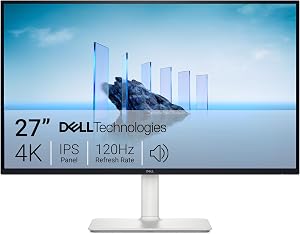
At $316.00, the Dell S3225QS undercuts most 32-inch 4K 120Hz monitors and still includes built-in speakers and an adjustable stand. By contrast, the 27-inch Dell S2725QS covers less DCI-P3 range, which is exactly why the S3225QS owns the 32-inch slot in our guide. Even so, the limits are real: 120Hz is not 160Hz, 300 nits keeps HDR subtle, and VA response trails Fast IPS, so very fast camera pans can smear. Connectivity is DisplayPort and HDMI only, with no USB-C for one-cable laptop docking. Buyers who need that should look elsewhere. If your day is spreadsheets, edits and streaming, with relaxed gaming after hours, this is the one to get.




Discussion
0 commentsLeave a comment